상위: Airflow
요약
Branching은 Airflow DAG에서 조건에 따라 실행 흐름을 분기하는 기능입니다. BranchPythonOperator를 사용하여 조건을 평가하고 특정 Task를 선택합니다. 선택되지 않은 Task는 자동으로 skipped 상태가 되며, 분기 후 합류 시 적절한 Trigger Rule 설정이 필요합니다.
Branching이란?
- Airflow DAG 실행 흐름을 조건에 따라 분기
- 특정 조건을 평가해 어떤 Task를 실행할지 동적으로 결정
- 선택되지 않은 Task는 자동으로 skipped 상태 처리
- 불필요한 작업을 줄여 실행 최적화
BranchOperator 종류
BranchPythonOperator: Python 함수로 분기 Task 결정BranchDagRunOperator: 다른 DAG 실행 분기BranchSQLOperator: SQL 결과로 분기
기본 사용법
조건 기반 실행
from airflow.operators.python import BranchPythonOperator

def choose_branch(**kwargs):
    value = "A"  # 실제로는 외부 데이터나 조건 평가
    if value == "A":
        return "task_A"
    else:
        return "task_B"

branch = BranchPythonOperator(
    task_id='branch',
    python_callable=choose_branch
)

task_A = BashOperator(task_id='task_A', bash_command='echo "A"')
task_B = BashOperator(task_id='task_B', bash_command='echo "B"')

branch >> [task_A, task_B]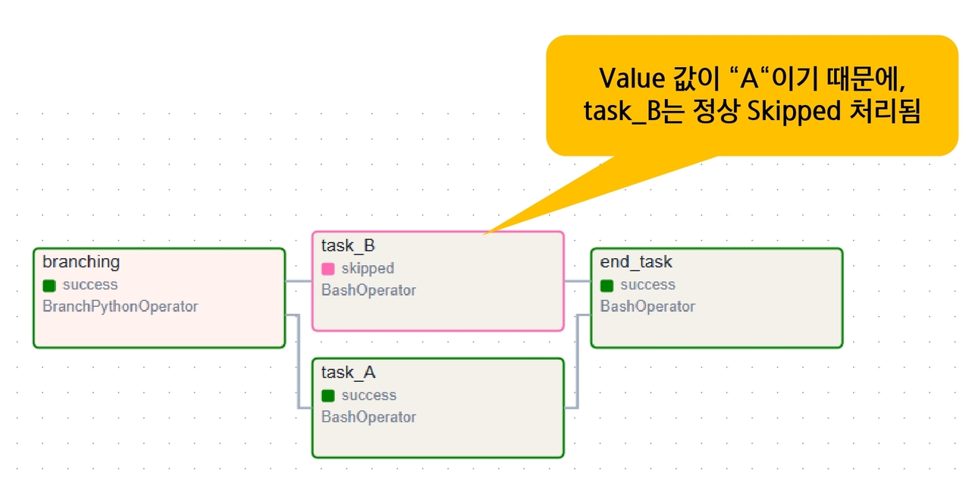
choose_branch()함수가"task_A"반환- task_A 실행, task_B는 skipped
실전 예제
API 응답 기반 분기
import requests

def choose_branch_by_api(**kwargs):
    response = requests.get("https://api.example.com/weather")
    temperature = response.json()["current_weather"]["temperature"]

    if temperature >= 15:
        return "task_hot"
    return "task_cold"

branch = BranchPythonOperator(
    task_id='branch_by_weather',
    python_callable=choose_branch_by_api
)

task_hot = BashOperator(task_id='task_hot', bash_command='echo "Hot day"')
task_cold = BashOperator(task_id='task_cold', bash_command='echo "Cold day"')

branch >> [task_hot, task_cold]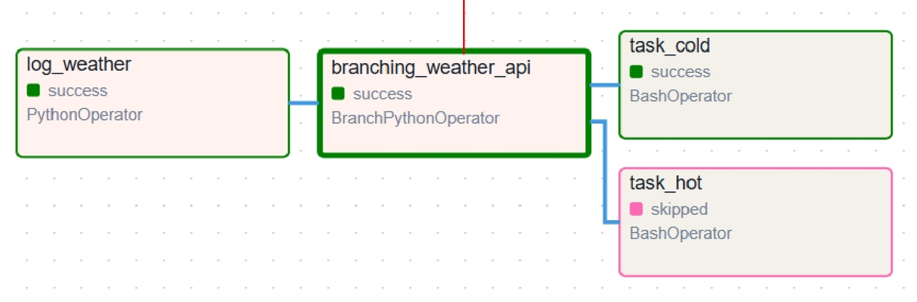
날짜 기반 분기
from datetime import datetime

def choose_branch_by_date(**kwargs):
    execution_date = kwargs['execution_date']

    if execution_date.weekday() < 5:  # 월-금
        return "weekday_task"
    return "weekend_task"

branch = BranchPythonOperator(
    task_id='branch_by_date',
    python_callable=choose_branch_by_date
)

weekday_task = BashOperator(task_id='weekday_task', bash_command='echo "Weekday"')
weekend_task = BashOperator(task_id='weekend_task', bash_command='echo "Weekend"')

branch >> [weekday_task, weekend_task]
데이터 크기 기반 분기
def choose_branch_by_size(**kwargs):
    # S3에서 파일 크기 확인
    file_size = get_s3_file_size('bucket', 'data.csv')

    if file_size > 1000000:  # 1MB 이상
        return "process_large"
    return "process_small"
여러 Task 반환
def choose_multiple_branches(**kwargs):
    condition = kwargs['dag_run'].conf.get('type')

    if condition == 'full':
        return ['task_1', 'task_2', 'task_3']  # 여러 Task 실행
    elif condition == 'partial':
        return ['task_1', 'task_2']
    else:
        return ['task_1']

branch = BranchPythonOperator(
    task_id='branch',
    python_callable=choose_multiple_branches
)
분기 후 합류
문제 상황
branch >> [task_A, task_B] >> join

# task_A 실행, task_B skipped
# join은 all_success 기본값이므로 실행 안됨 (task_B가 skipped)
해결책: Trigger Rule 설정
from airflow.operators.empty import EmptyOperator

branch >> [task_A, task_B] >> join

join = EmptyOperator(
    task_id='join',
    trigger_rule='none_failed_or_skipped'  # 필수!
)
자세한 내용은 Trigger Rules 참조
주의사항
반환값은 task_id
# ✅ 올바른 사용
def choose_branch():
    return "task_A"  # task_id 문자열 반환

# ❌ 잘못된 사용
def wrong_branch():
    return task_A  # Task 객체 반환 (에러)
분기 함수는 task_id(들) 반환 필수
# ✅ 단일 task_id
return "task_A"

# ✅ 여러 task_id
return ["task_A", "task_B"]

# ❌ None 반환 (에러)
return None
Skipped Task는 실패 아님
- Skipped 상태는 정상적인 상태
- 하지만 기본 Trigger Rule(
all_success)은 skipped를 실패로 간주 - 분기 후 합류 시 반드시 Trigger Rule 조정
고급 패턴
중첩 분기
def first_branch():
    if condition_1:
        return "second_branch"
    return "task_direct"

def second_branch():
    if condition_2:
        return "task_A"
    return "task_B"

first = BranchPythonOperator(task_id='first_branch', ...)
second = BranchPythonOperator(task_id='second_branch', ...)

first >> [second, task_direct]
second >> [task_A, task_B]
분기 + XCom
def branch_with_xcom(**kwargs):
    ti = kwargs['ti']
    result = ti.xcom_pull(task_ids='previous_task')

    if result > 100:
        return "high_value_task"
    return "low_value_task"
자세한 내용은 XCom 참조
다음 단계
- Trigger Rules - 분기 후 합류 시 필수
- Task Dependencies - Task 의존성 이해
- XCom - 분기 조건에 데이터 활용